
The Agentic AI Multi-Agent Pattern
The Multi-Agent Pattern is built around a simple idea: instead of forcing one model to do everything, you create several independent agents that each focus on a single piece of the puzzle. These agents don’t share their brain, but they do work together. Each has its own role, its own instructions, and sometimes even its own model or toolset. When they communicate, they move information from one agent to another in a controlled, structured way, almost like an assembly line designed for reasoning.
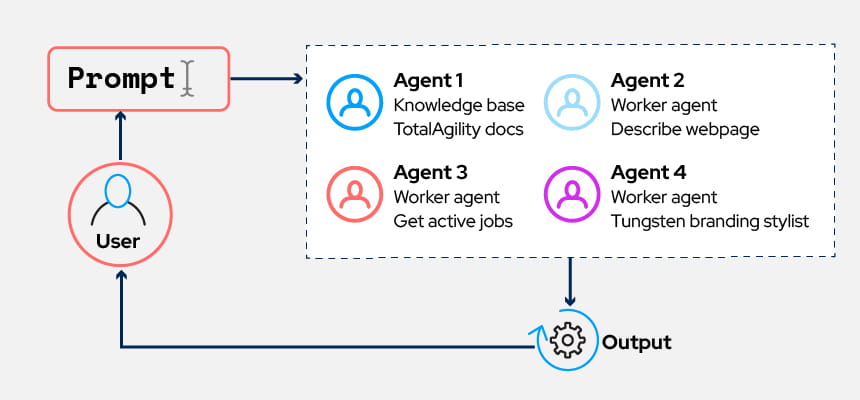
At its heart, this pattern raises two questions:
- Who are the agents?
What responsibilities do we split up? Do we need a planner, a researcher, a writer, an analyst, a fact-checker? - How do they talk to each other?
Does one agent supervise the others? Do they take turns? Do they collaborate on the same workspace? Or are they arranged in layers?
Thinking this way naturally leads to a system where tasks are broken down into manageable units, and each agent becomes very good at its own piece of work. You avoid the problem of asking a single model to juggle dozens of tools, dozens of instructions, and every phase of a workflow at once.
Glossary: Key Concepts Explained
| Term | Explanation |
|---|---|
| Multi-Agent System | An AI architecture where multiple specialized agents collaborate to complete a broader task, rather than relying on a single monolithic model. |
| Agent Orchestration | The coordination logic that defines how agents interact, hand off tasks, share context, and resolve conflicts within a structured workflow. |
| Role Specialization | The design principle of assigning distinct responsibilities to different agents (e.g., planner, researcher, validator, executor) to improve reliability and scalability. |
| Shared Context | A controlled memory or data layer that allows agents to access consistent information while maintaining governance and auditability. |
| Conflict Resolution | Mechanisms used when agents produce differing outputs, ensuring the system selects or validates the most reliable result. |
Why do Multi-Agent Designs Work?
Splitting responsibilities across agents has several advantages:
- Clear, focused roles
An agent handling one specific job (like summarizing research or checking citations) usually performs better than a single, overloaded model doing everything at once. - Different prompts for different minds
Each agent can have its own style of reasoning. A planner might use a structured template. A writer might rely on creative phrasing. A fact-checker might enforce stricter logic. You get the best of each approach instead of compromising. - Better modularity
If one skill isn't working well, you can improve or replace that agent without touching the others. It's closer to tuning a team than fixing one giant, fragile script. - Scales to complex work
When a problem has many moving parts: research, data lookup, quality review, decision making, breaking it into multiple agents makes the overall system easier to build, maintain, and extend.
Common Multi-Agent Archetypes
Different applications tend to adopt different multi-agent layouts. Here are three patterns you’ll see often:
1. Collaborative Agents (Shared Workspace)
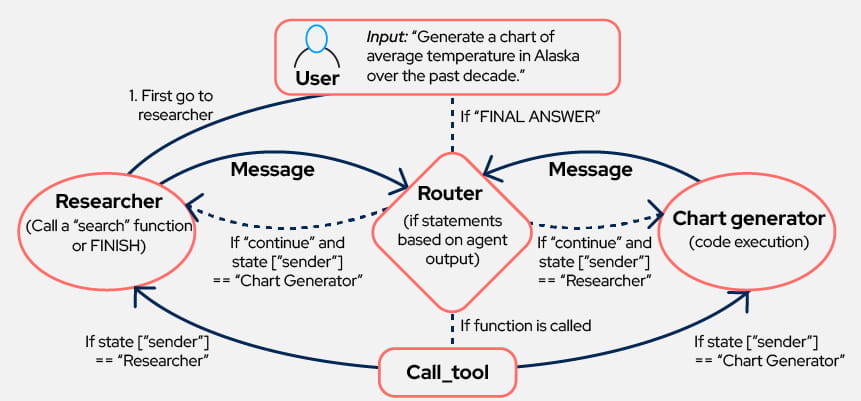
In this setup, several agents work in a single shared space, think of it as a digital whiteboard where every agent can see what the others are doing. As each agent adds notes, the others pick up where the previous one left off.
Example:
A customer-support workflow where one agent analyzes the customer issue, another drafts a reply, and a third agent cleans up tone and clarity. All of them work inside the same conversation history, so none of the context is lost.
2. Case agent (Managing Agent) & Worker Agents
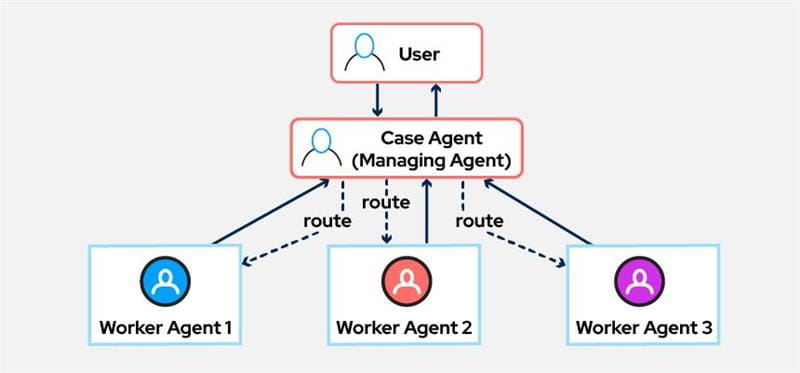
Here, each agent works in its own private space. They don’t see each other’s thought process. A supervisor agent/Case Agent (Managing Agent)decides who should take the next turn and combines their final outputs.
Example:
In an insurance company, a supervisor agent might route a claim to:
- a policy-understanding agent
- a risk-analysis agent
- a payout calculation agent
Each returns their results, and the supervisor assembles a final decision.
3. Hierarchical Teams (Agents Within Agents)
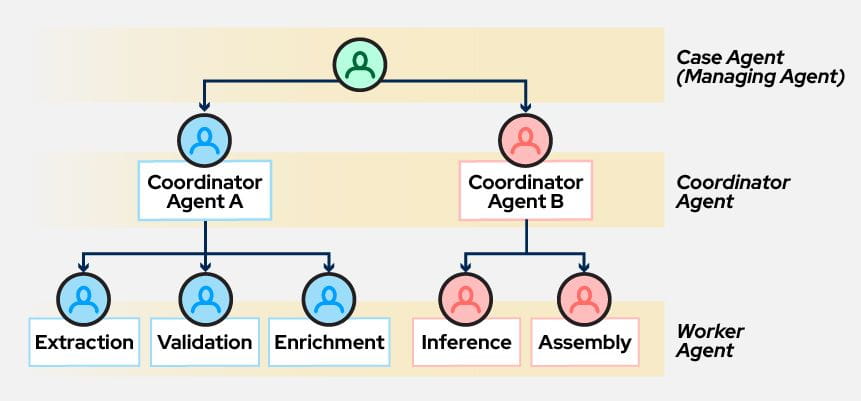
This pattern creates “teams within teams.” An agent can act as the lead and call entire sub-groups of other agents beneath it. The structure resembles a real organization: strategist → specialists → tools.
Example:
A product-development AI might have:
- a top-level “Product Director” agent
- Product Development Agent
- a market-analysis team agent
- a technical feasibility team agent
Each team of agents internally runs smaller agents to handle research, modeling, or evaluation.
Let’s say a user inside an enterprise asks:
"Can you tell me which of my active jobs are still pending, check if any tasks are waiting for me, find relevant documentation from the knowledge base, and store the summary for later?"
If we were to rely on a single model, it would likely guess or hallucinate because it has no real access to systems, files, or business data.
But with a Multi-Agent Pattern, the system breaks the request into pieces and hands each part to the right specialist:
These are the micro or worker agents s we have created in TotalAgility
1. Get Active Jobs – tools/service
The request first goes to the Get Active Jobs agent. It pulls all active jobs from TotalAgility for that specific user and formats the result.2. Get Tasks – tools/service
Next, another agent checks the user’s pending tasks and returns them either in the format the user requested or in a clean table.3. Knowledge Base – TotalAgility Docs – Micro agent
The system then calls the Knowledge Base agent to answer any documentation-related questions; like how a job transitions, how tasks escalate, or what the underlying workflow API looks like.4. Researcher –Micro agent
If the user includes a broader question like, “also check if there are industry best practices for this workflow,” this researcher agent performs multi-step web research and returns references.5. File Describe – tools/service
If a file is attached, for example, a screenshot of an error or a workflow diagram, this agent interprets the file and adds the insights to the growing summary.6. Save Prompt to File / Save Document to File – Micro agent
Once everything is compiled, the system uses one of the Service agents to store the final summary or related documents in the user’s storage container. If the container doesn’t exist, the agent creates one automatically.
7. Direct Reply Tool
Finally, once all agent outputs are gathered and stitched together, the system sends a clean, human-readable response back to the user. This is the whole spirit of the Multi-Agent Pattern: a collection of small, dependable agents that work together like a well-drilled operations crew. Leverage the power of Multi-Agent systems with TotalAgility and discuss with the team your use cases.
Discover how to improve your workflows with TotalAgility: request a demo now.
More in the Agentic AI Design Patterns series
This article explores one of the core Agentic AI design patterns in depth, while the rest of the series provides detailed breakdowns of the other patterns that shape enterprise-grade AI systems.
Frequently Asked Questions (FAQ)
What is the Agentic AI Multi-Agent Pattern?
The Multi-Agent Pattern structures an AI system as a coordinated group of specialized agents, each responsible for a distinct task within a larger workflow.
Why use multiple agents instead of one large model?
Specialized agents reduce cognitive overload, improve accuracy, and make enterprise AI systems more modular, governable, and scalable.
How do multi-agent systems coordinate effectively?
Through orchestration logic that defines task sequencing, shared memory access, and clear handoffs between agents.
Are multi-agent architectures more reliable in enterprise settings?
Yes. By separating planning, execution, validation, and oversight into distinct roles, organizations reduce risk and improve transparency in production AI workflows.
What challenges come with multi-agent systems?
Key challenges include coordination complexity, latency between agents, conflict resolution, and maintaining consistent context across the system.

Agentic AI Design Patterns for Enterprise AI Systems
This article is part of a dedicated series exploring how Agentic AI Design Patterns help enterprises build reliable, governable, and scalable AI agents. This post focuses on the Multi-Agent Pattern and explains how specialized agents collaborate, coordinate responsibilities, and operate within structured architectures to handle complex, multi-step enterprise workflows.
More in this series:
- Why building truly agentic AI means engineering the whole brain - A sharper take on agentic AI: why an LLM alone is not enough, and why memory, tools, planning, reflection, and coordination must work together as one system.
- Agentic AI Design Patterns: An Overview - A high-level introduction to agentic AI systems and the core design patterns used in enterprise environments.
- The Agentic AI Reflection Pattern - How structured self-review loops improve accuracy, reduce hallucinations, and introduce validation safeguards in enterprise AI systems.
- The Agentic AI Tool-Use Pattern - Enabling AI agents to interact with external tools, APIs, and enterprise systems to take real-world action.
- The Agentic AI Planning Pattern - How structured planning and task decomposition support long-running, goal-driven AI workflows.

Gartner® recognizes Tungsten Automation again as a Leader in the second edition of the Magic Quadrant™ for Intelligent Document Processing (IDP).
Bericht lesen
Kontaktieren Sie uns
Vernetzen Sie sich mit einem Experten von Tungsten Automation, um mehr über unsere Lösungen zu erfahren.

Demo anfordern
Erfahren Sie in einer personalisierten Demoversion aus erster Hand, wie wir Ihnen in Sachen Innovationen und Produktivität unter die Arme greifen und Sie dabei unterstützen können, Ihren Geschäftserfolg voranzutreiben.